
What Pool Lights Work With AquaLink?
Pool LEDs change color by being switched off and on in rapid pulses — each brand uses a different sequence, which is exactly why AquaLink needs a factory profile for your specific light.
 Eugen
EugenEugen Nikolajev
Creator of LED Lighting Info
Hi, I am Eugen. I was always one of those kids who had all sorts of weird lighting gadgets for every occasion.
Now, I want to share my knowledge and experience about lighting with you on LED Lighting Info.
Read my editorial standards
Key Takeaways
The iAquaLink app and AquaLink controllers ship with factory-programmed profiles for color LED pool lights from Jandy, Hayward, and Pentair. Compatibility is deepest with Jandy fixtures, since both belong to the same parent company; Hayward ColorLogic and Pentair IntelliBrite lights can be wired in and cycled through their preset colors, but feature parity is tighter when the light brand matches its native automation system.
AquaLink is one of the most popular pool automation systems on the market — but which pool lights does it actually work with, and is it the right choice for your setup?
Here's what the rest of this guide covers:
- What iAquaLink is and who makes it
- Which pool lights are factory-programmed to work with it
- How to add lights, and how to sync different brands on the same panel
What Is iAquaLink For?
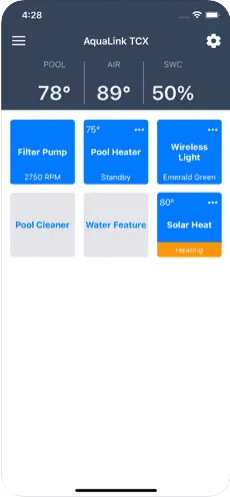
iAquaLink is the companion app for the AquaLink pool automation system, made by Jandy — a brand of Fluidra, the global pool-products group that merged with Zodiac in 2018. Fluidra also owns Polaris, AstralPool, and Zodiac, and its broader catalog includes heaters, filters, robotic cleaners, and lighting.
iAquaLink refers to the app; AquaLink is the central controller hardware.
Jandy makes its own pool lights (the WaterColors and Infinite WaterColors lines), but AquaLink is also factory-programmed to recognize the major competitor lines from Pentair and Hayward — so a mixed-brand pool isn't an automatic dealbreaker.
An automation system is a controller that lets you program all your pool equipment and operate it remotely from a smartphone or tablet. The AquaLink setup has three main parts:
| Component | What It Is | Role |
|---|---|---|
| AquaLink Controller | Physical panel box at the equipment pad | Wired hub for pumps, heater, lights, and other pool equipment |
| Wi-Fi Web Connect Module | Add-on board that plugs into the panel | Bridges the controller to your home Wi-Fi and Jandy's cloud |
| iAquaLink App | Smartphone app (iOS / Android) plus web dashboard | Remote control, scheduling, and color/show selection for lights |
The pool controller is the primary box into which all your pool equipment is wired. From there, the panel can run schedules or switch individual circuits on and off.
The Wi-Fi module is what makes the system controllable from a phone. Older AquaLink installs sometimes used a generic RF receiver, but the current product is the iAquaLink web connect module — it plugs into the panel and links it to Jandy's cloud over your home Wi-Fi.
The panel isn't just a switch box. It's pre-programmed to recognize specific equipment, so you can read sensor data and customize behavior from one place. With a pool filter, you can check filtration and water quality. The thermometer feeds live water temperature back to the app. And with pool lights, you can control color and shows — not just on/off — provided the lights are on the compatibility list.
What Types Of Lights Work With iAquaLink?
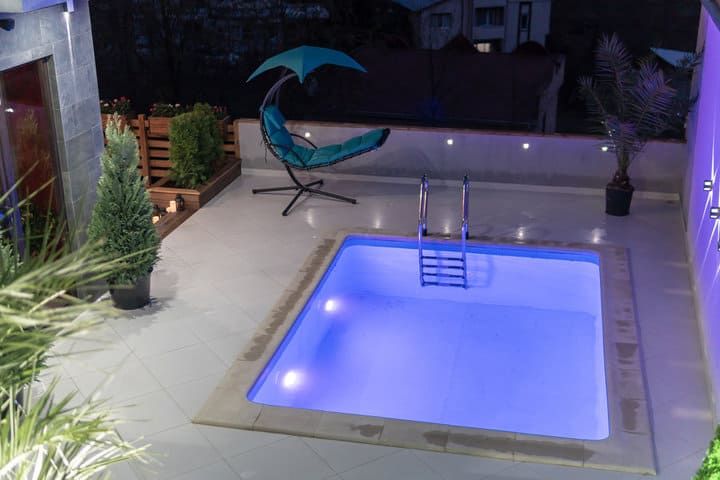
Beyond on/off and scheduling, iAquaLink can change the color of lights it has been factory-programmed to recognize. It won't drive arbitrary RGB fixtures — pool lights have brand-specific color-cycling protocols, and the panel needs to know which protocol to use for each aux circuit.
AquaLink ships with profiles for the most common pool LED lines:
- Jandy WaterColors LED
- Jandy Infinite WaterColors (uses a digital RS-485 protocol — see the note below)
- JandyColors (a discontinued color-wheel halogen line, not LED — kept on the list because the niches are still in service)
- Pentair IntelliBrite LED
- Discontinued Pentair SAm and SAL (replaced by IntelliBrite, but retrofit kits and replacement parts are still sold for existing niches)
- Hayward Universal ColorLogic LED
One protocol-level exception is worth flagging. Most of the lights above change color by being power-cycled rapidly — the wall switch (or aux relay) flicks off and on a specific number of times to advance through preset shows. Jandy Infinite WaterColors works differently. It uses a digital RS-485 protocol over the iAquaLink bus, so color and show selection is sent as a direct command rather than as a pulse sequence. The lights don't need to flicker through anything; they just receive the new color.
If you wire a non-listed color LED light into AquaLink, the color commands won't map to the right pulse sequence. In practice, that means the light will land on an unintended color, fail to advance when you ask for a specific show, or cycle through a sequence that doesn't match what the app is showing. See this guide on pool lights that won't change color for the diagnostic steps.
How To Add Lights To iAquaLink

Anything you connect to your AquaLink panel takes up an "aux" slot — a relay port that the controller can switch on and off. Aux capacity scales with the panel size: AquaLink RS panels come in 4-, 8-, 14-, and 16-circuit versions (the model number is the relay count — RS-8 has eight, RS-16 has sixteen). Most residential systems land at eight. A single aux can drive an individual device or a string of lights wired together on one circuit.
Once the light is wired into a free aux, the rest of the setup happens in the app:
- Open System Setup, then choose Label Aux.
- Pick a pre-existing label ("Pool Light," "Spa Light," etc.) or enter a custom name, then save.
- Back out to the System Setup menu and choose Color Lights.
- Select the aux you just labeled. The app shows a button for each compatible light type.
- Tap the button that matches your fixture (Jandy WaterColors, Pentair IntelliBrite, Hayward ColorLogic, etc.).
- Save. The light is now controllable — color, show, and on/off — from the main menu.
A note on the wiring side of this work: pool equipment combines line-voltage (120/240 V) and low-voltage circuits in close proximity to water, and most jurisdictions require permits and licensed electricians for panel-side modifications. Bonding and grounding mistakes around a pool can be lethal. Unless you're a licensed electrician or pool technician, leave the panel and aux wiring to a professional. The app-side setup above is safe for any owner to do once the lights are wired in.
How To Sync Different Pool Lights

Mixing brands on one AquaLink panel is allowed, but it adds a wrinkle. Most pool lights aren't like RGB bulbs that accept a hex color — they switch between a fixed list of preset colors and shows, and they advance through the list by being power-cycled. Each manufacturer uses a different cycle order and a different number of pulses to land on each color.
AquaLink already knows the cycle for each supported brand, so as long as each set of lights is on its own aux and labeled with the correct light type, the controller handles the protocol differences automatically. There's no manual sync step.
The one thing to confirm before pressing "all lights to red" is that each aux is configured correctly on its own. Set each light to plain white from its own aux first. If both auxes can reach white from the same starting state, AquaLink can drive them in lockstep from there. Skip this step and you may end up with mismatched colors when a global command runs.
For example, if you're combining Jandy and Hayward fixtures, set up the Jandy lights on one aux and switch them to white to confirm. Then add the Hayward lights to a second aux and do the same. Once both can reach white independently, a global "red" command will run the Jandy color cycle on aux one and the Hayward color cycle on aux two, and both ends of the pool will land on red together.
App Availability and Wi-Fi Requirements
The iAquaLink app is available on both iOS and Android, and Jandy also offers a browser-based dashboard for desktop access. The app doesn't talk directly to the panel — it goes through Jandy's cloud — so the panel needs reliable internet, not line-of-sight to your phone. Once that connection is up, you can control the pool from anywhere your phone has data.
The Wi-Fi web connect module uses 2.4 GHz Wi-Fi rather than 5 GHz. That's the right tradeoff for a panel sitting outdoors at the equipment pad — 2.4 GHz has noticeably better range and penetrates exterior walls more easily — but it also means a router buried inside the house may not reach. If the module loses connection or refuses to associate, the usual fixes are a mesh node placed closer to the pad, an outdoor-rated access point, or a dedicated 2.4 GHz extender. Mesh networks work fine as long as the module ends up associated with a strong-enough 2.4 GHz radio.
Final Words
AquaLink remains one of the most flexible pool automation systems precisely because it ships with factory profiles for the three biggest light brands. Compatibility is deepest with Jandy's own WaterColors and Infinite WaterColors lines (Infinite WaterColors uses direct digital control over RS-485, the rest rely on power cycling). Pentair IntelliBrite and Hayward Universal ColorLogic fixtures will also work, but feature parity is tighter when the light brand matches the panel brand.
Setup itself is straightforward once the lights are wired in correctly: label the aux, assign the light type in the Color Lights menu, and save. Leave the panel-side wiring to a licensed electrician or pool tech, give the web connect module a strong 2.4 GHz signal, and the app will let you run the pool from anywhere — including from a vacation 2,000 miles away.