
How To Control Pool Lights With Phone?
Radio signals drop to a reliable range of just 10–20 cm underwater, which is why your pool lights will never be smart — the controller has to stay above the waterline.
 Eugen
EugenEugen Nikolajev
Creator of LED Lighting Info
Hi, I am Eugen. I was always one of those kids who had all sorts of weird lighting gadgets for every occasion.
Now, I want to share my knowledge and experience about lighting with you on LED Lighting Info.
Read my editorial standards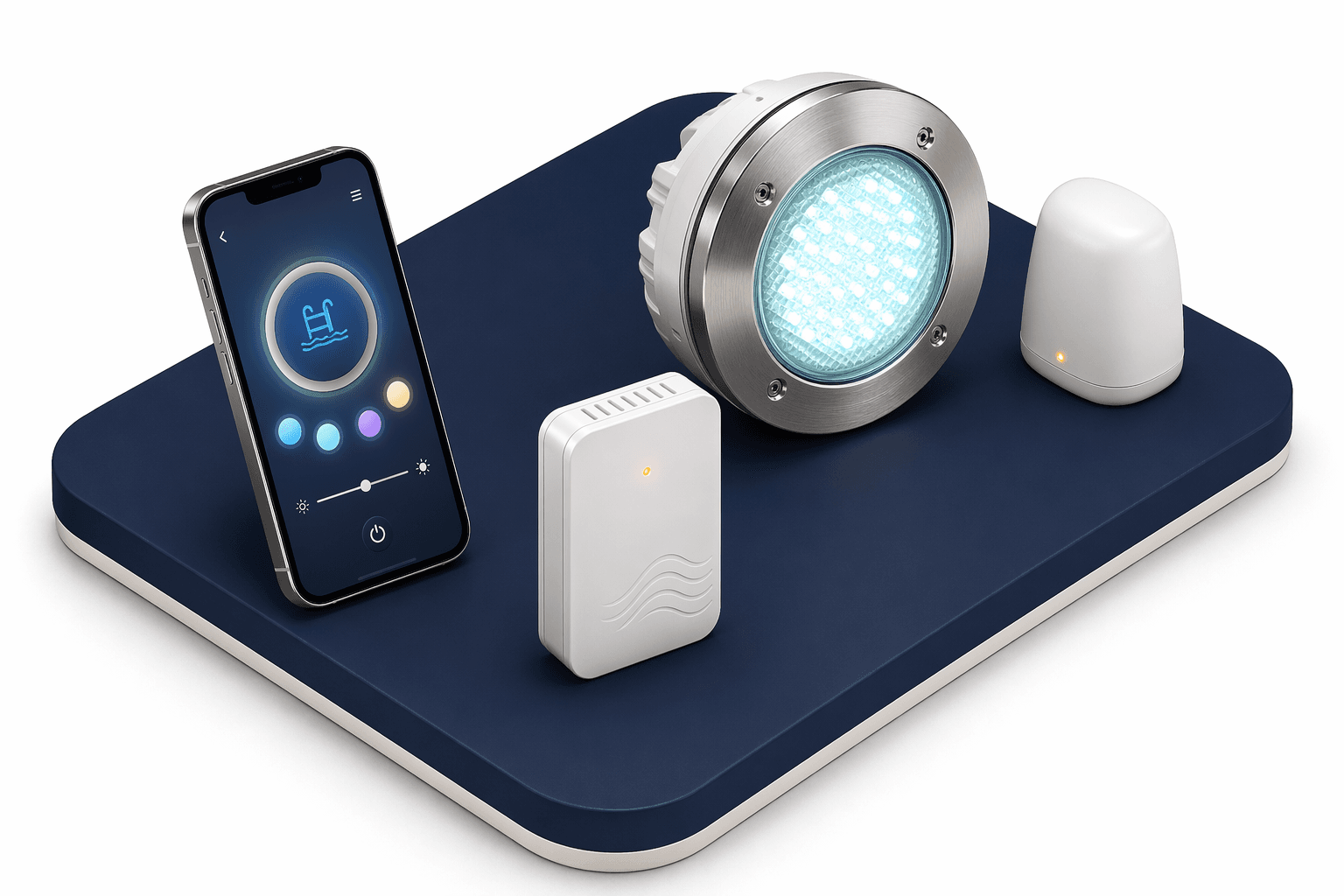
Key Takeaways
You can control pool lights via your app with a compatible pool controller installed. The app communicates with the pool controller, turning your lights on or off or changing their color. You need to make sure the controller is designed for your lights.
In this guide:
- What an automated smart pool system is
- An overview of the Hayward OmniLogic setup process
- Other automation systems you could use
- Safety and electrical requirements
- Troubleshooting common issues
What Is An Automated Smart Pool System?
Pool lights themselves aren't smart, and they can't easily be — radio signals don't propagate well through water.
Peer-reviewed measurements show that 2.4GHz signals (the band Wi-Fi and Bluetooth share) attenuate sharply once submerged: reliable range drops to roughly 10–20 cm in freshwater and just a few centimeters in saltwater. To control pool lights remotely, the controller has to sit above the waterline.
That's what an automated smart pool system does. A hub above the deck connects all your pool equipment — lights, heater, filter, cleaner — and bridges them to your home Wi-Fi so you can control everything from an app on your phone or tablet, whether you're poolside or away from home.
Once you're connected, the typical use cases include:
- Schedule lights to turn on and off at exact times — sunset, party hours, or a fixed nightly window.
- Switch everything off remotely if you forgot before leaving for vacation.
- Voice-control via Alexa or Google Assistant — most major pool automation systems include skills or actions out of the box.
- Trigger a motion sensor at the patio that turns the pool lights on automatically when someone steps outside.
If you already run a wider home automation platform, pool systems can plug into it:
- Apple HomeKit — control pool lights from the Home app and include them in scenes (a "Movie Night" scene that dims indoor lights and brings the pool lights up at 30%).
- Samsung SmartThings — bundle the pool, outdoor speakers, and patio heaters into a single "Party" routine that fires from one tap or a voice command.
- Domoticz — an open-source home automation platform that's less mainstream than HomeKit or SmartThings, but lets you script almost anything if you're comfortable in a config file.
How To Install And Use The Hayward Pool App
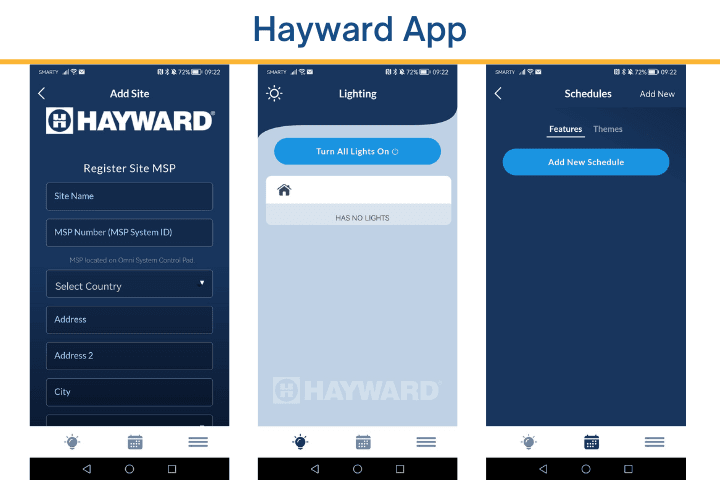
Hayward is one of the most common pool-automation brands in the U.S. Their flagship is the OmniLogic — a full pool automation hub. Paired with compatible lights (Hayward Universal ColorLogic models built after June 2018, J&J ColorSplash, VÜ Retro J Models, or ColorLogic Landscape lights), it gives you on/off, color, and dimming control from your phone.
If you don't have an OmniLogic-equipped pool, Hayward's current retrofit add-on is the OmniHub. It bridges most existing Hayward controllers (ProLogic and AquaPlus on firmware v4.20+, AquaRite Pro on v1.2+) to your home Wi-Fi. The older AquaConnect device is still sold but has effectively been superseded — start with OmniHub if you're shopping today.
Setting up the OmniLogic
- Download the Hayward OmniLogic app from the App Store or Google Play (free).
- Create an account. You'll receive a 4-digit code by email to verify it.
- Enter the pool details you set when installing your OmniLogic controller. If you haven't configured the controller yet, the app walks you through entering site details from scratch.
- The app pairs with your pool over Wi-Fi, and you're ready to switch lights on, change color, and build schedules from the Schedules tab.
If you're using older AquaConnect-era hardware instead, first connect the antenna to the hub and a separate receiver to your router, then press the Teach button (a pairing button that synchronizes the receiver and the control panel) on both devices to bind them. After that, the app setup is similar.
One detail worth knowing: your phone doesn't connect directly to the OmniLogic hub. It connects through your home router, which talks to the hub over Wi-Fi. The hub therefore needs a strong Wi-Fi signal at the equipment pad — without it, you'll see connection issues no matter how clean the app setup was. A mesh Wi-Fi node or a dedicated outdoor extender between the router and the equipment pad is usually the cleanest fix.
Safety And Electrical Requirements
Pool lighting sits in one of the most demanding electrical environments in any home. In the U.S., installation must comply with NEC Article 680, which governs grounding, bonding, transformer placement, and conductor routing for pools and spas. Any new wiring, fixture replacement, or transformer swap near the pool should be handled by a licensed electrician — there's no DIY shortcut worth the risk here.
Voltage matters too. Most modern color-changing LED pool lights run on 12V through a transformer mounted at deck level. Some older fixtures still run on 120V line voltage. Before buying any automation hub, controller, or relay, confirm what voltage your lights actually use — the automation gear and any in-line driver has to match.
Other Automation Systems For Pool Lights
Hayward isn't the only option. The big three pool-automation ecosystems all work similarly — the hub talks to your equipment over a wired bus, and an app talks to the hub over Wi-Fi — but each has its own compatible-light list and its own app:
| System | App | Compatible Color Lights | Smart Home Integration |
|---|---|---|---|
| Hayward OmniLogic / OmniHub | Hayward OmniLogic | Universal ColorLogic (post-June 2018), J&J ColorSplash, VÜ Retro J Models, ColorLogic Landscape; on/off only for non-Hayward via relay | Alexa, Google Assistant |
| Pentair IntelliCenter / EasyTouch | Pentair Pool (formerly ScreenLogic2) | IntelliBrite Architectural Series and IntelliBrite 5G; Color Sync Controller for standalone color use | Alexa, Google Assistant |
| Jandy AquaLink RS | iAquaLink | Jandy, Pentair, and Hayward color lights via dedicated color-change modes; on/off for any brand via aux relays | Alexa, Google Assistant, IFTTT |
A few caveats are worth pulling out of that table:
- Pentair: IntelliBrite is the LED-light line, not the app. The current LED is the IntelliBrite Architectural Series; the older IntelliBrite 5G is being phased out. The app is Pentair Pool (formerly ScreenLogic2), running on top of an IntelliCenter or EasyTouch automation controller. If you only need standalone color control without a full automation system, Pentair's Color Sync Controller works directly with IntelliBrite lights.
- Jandy / Zodiac / Fluidra: AquaLink and iAquaLink are Jandy products under the Zodiac (now Fluidra) umbrella. iAquaLink is the most flexible cross-brand option — it can switch any brand of light on or off through an auxiliary relay and supports color-change sequences for Jandy, Pentair, and Hayward color lights. The catch: each manufacturer's protocol cycles colors with different timing, so synchronized color across mixed brands isn't perfectly seamless. Wire each brand to its own Aux port and command them independently.
- Hayward: OmniLogic can power Pentair or other-brand lights on and off through a relay, but full color control requires Hayward-protocol lights (Universal ColorLogic, J&J ColorSplash). Don't assume color sync between brands here.
If you already have lights installed, check the make and model first — the system you choose has to match. If you're in the planning stage, you have a clean slate; just commit to one manufacturer's ecosystem early to avoid the mixed-brand limitations above.
Troubleshooting Common Issues
A few problems come up repeatedly once a system is installed:
- App won't connect to the hub. Verify the hub has power, your home Wi-Fi reaches the equipment pad, and the hub's status LED is solid (not blinking). Many automation hubs only support 2.4GHz networks — they won't pair with a 5GHz-only or Wi-Fi 6E-only router.
- Wi-Fi signal too weak at the hub. Equipment pads tend to sit far from the router. Add a mesh node or outdoor extender between the router and the pad rather than relocating the router itself.
- Lights respond to on/off but not color. The lights aren't running the controller's color protocol. Either they pre-date it (Hayward Universal ColorLogic before June 2018, for example) or they're a different brand wired through a basic relay. Color-changing requires a protocol-matched fixture.
- Schedules don't fire. Confirm the hub's clock is synced to your local time zone, and that the schedule was saved (not just edited) in the app. Power outages that reset the hub will sometimes reset the time too.
Final Words
Picking the right system mostly comes down to the equipment you already own:
- If you already have Hayward equipment, OmniLogic (for new installs) or OmniHub (for retrofits) is the path of least resistance.
- If you're a Pentair household, IntelliCenter (or EasyTouch on smaller setups) plus the Pentair Pool app is the natural fit.
- If you have mixed brands, or you're starting from scratch and want maximum flexibility, iAquaLink is the most accommodating system today.
Whichever direction you go, confirm your lights' protocol and voltage before buying anything, make sure your Wi-Fi reaches the equipment pad with a strong signal, and bring in a licensed electrician for any wiring work near the pool.
FAQ
Can pool lights be controlled directly over Bluetooth from my phone underwater?
No. The 2.4GHz band — which Bluetooth and Wi-Fi share — doesn't propagate through water at any useful range; reliable distances drop to roughly 10–20 cm in freshwater and just a few centimeters in saltwater. Any "smart" pool light you control from a phone is really being switched by a hub above the waterline that talks to the lights over wires.
Do I need a full automation hub to control my pool lights from my phone?
Not always. Pentair's Color Sync Controller, for example, gives standalone color and scheduling for IntelliBrite lights without a full automation system, and off-the-shelf Wi-Fi smart switches will let you toggle pool lights on and off (but not change color). Full color control plus heater, pump, and chemistry control is where a proper automation hub earns its place.
Will my existing pool lights work with a new automation hub?
On/off control will almost always work, since any hub can switch a fixture through an auxiliary relay. Full color control requires lights that speak the hub's protocol — for Hayward that means Universal ColorLogic models built after June 2018; for Pentair, IntelliBrite lights paired with an IntelliCenter or EasyTouch.
Can one app control different brands of pool lights at the same time?
Jandy's iAquaLink comes closest — it supports Jandy, Pentair, and Hayward color modes from a single app. Synchronized color across brands isn't perfect because each manufacturer's protocol cycles colors with different timing, so you typically wire each brand to its own Aux port and command them as separate channels.