
Can Wind Set Off Security Light?
A PIR sensor can't see moving air — but a sun-warmed branch swaying across its detection zones looks exactly like a person walking past. Wind doesn't trip the light; it trips whatever the light is aimed at.
 Eugen
EugenEugen Nikolajev
Creator of LED Lighting Info
Hi, I am Eugen. I was always one of those kids who had all sorts of weird lighting gadgets for every occasion.
Now, I want to share my knowledge and experience about lighting with you on LED Lighting Info.
Read my editorial standards
Key Takeaways
On its own, the wind won't trigger the motion sensor of a security light. But it can cause something else to trigger the sensor — most often tree branches, loose garden items, or sun-warmed surfaces being blown across the sensor's field of view.
False triggers waste energy and disturb neighbors, so it's worth knowing why a sensor reacts to wind and what to do about it. In this article I'll cover:
- How security lights' motion sensors actually work
- Why wind itself doesn't set off a PIR sensor
- What conditions can set off a sensor when it's windy — and how to fix them
How Do Security Light Motion Sensors Work?
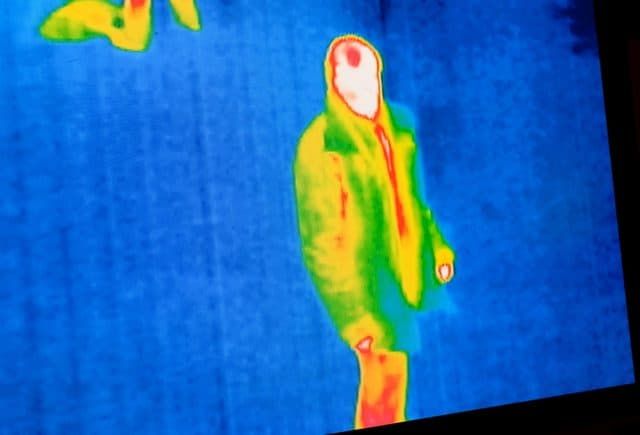
There is no "basic light-based" motion sensor in standard residential security lights — that framing is a myth. Almost every consumer security light uses one of four detection technologies, and the differences matter when you're trying to figure out why yours keeps tripping in the wind.
By far the most common is the Passive Infrared sensor (PIR). A PIR doesn't see motion directly — it watches for changes in infrared heat across a grid of detection zones. When a warm body crosses from one zone to the next, the sensor reads the temperature shift and switches the light on.
PIR is the cheapest and most widespread technology in residential security lights, and it's the one I'll focus on for the rest of this article.
The other three options show up in larger or trickier installations:
| Sensor Type | How It Detects Movement | Where You'll See It |
|---|---|---|
| PIR (Passive Infrared) | Reads changes in infrared heat as a warm body crosses detection zones. | The default for residential security lights — affordable and reliable. |
| Microwave / Radar | Emits low-power RF waves and measures Doppler shifts in the reflection. | Larger commercial spaces, parking lots, and through-wall coverage. |
| Ultrasonic | Emits high-frequency sound and measures reflections. | Indoor occupancy sensing, rarely outdoors. |
| Dual-Tech (PIR + Microwave) | Requires both sensors to agree before triggering. | Wind-prone, vibration-prone, or high-false-alarm outdoor spots. |
Pet-Immune PIR Sensors
Some PIR sensors are advertised as "pet-immune," but they don't work by detecting a uniquely human heat signature. Humans run around 37 °C and cats and dogs run 38–39 °C — the infrared they emit is essentially indistinguishable.
Pet immunity comes from lens geometry instead: the Fresnel lens is shaped so the lower zones (where pets walk) have reduced sensitivity, and the sensor analyzes the size and movement of the heat source to ignore animals up to roughly 40–50 lbs. If you have a large dog, no consumer sensor will reliably tell it apart from a person.
Switching Lifespan
Older fixtures use electromechanical relays, which have a finite number of switching cycles — frequent false triggers will wear them out. Modern LED security lights mostly use solid-state switching with no mechanical contacts, so cycle wear is far less of a concern. The sensor module itself, however, still benefits from being left alone: every false trigger is a needless on/off cycle for the electronics and the lamp.
Can Wind Set Off A Motion Detector?

In normal conditions, wind alone can't set off a PIR motion detector. Air doesn't carry a localized heat pattern that the sensor can resolve, so the wind blowing past produces no IR signature for it to react to. Microwave sensors don't trigger on still air either — RF passes straight through it. Wind by itself simply isn't visible to either technology.
If your security light is switching on during wind, the cause is almost always either something the wind is moving in front of the sensor, or a problem with the sensor housing itself. Start by checking the housing — if it's cracked or loose, gusts of cool air can reach the pyroelectric element directly and cause sudden temperature swings that the sensor reads as motion.
Moisture getting in through the same cracks can also cause electronic faults and false triggers. If the housing is damaged, check whether your fixture is still under warranty; many manufacturers will replace the sensor head separately, but on integrated LED units the whole fixture often has to go.
If the housing looks fine, the wind is almost certainly setting off a chain reaction — something else in the field of view is moving.
Why A Motion Detector Triggers When It's Windy
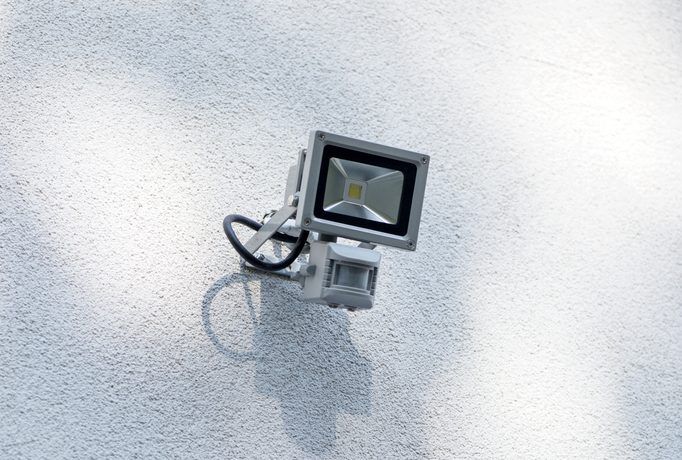
There are three common ways the wind sets off a PIR sensor indirectly:
- Sun-warmed objects moving through the field of view. Tree branches, leaves, fences, walls, and tall grass all hold heat for hours after sundown. When wind sweeps a sun-warmed branch across the sensor's zones, the branch itself is the warm object — its heat signature crosses zones the same way a person would. This is the single most common cause of windy-night false triggers.
- Branches obscuring a background heat source. If there's a street light, neighbor's window, or other heat-emitting source behind the tree, swaying branches alternately block and reveal it. The PIR reads those changes as motion.
- Loose objects being blown around. Patio cushions, garden tools, trash bags, even paper — anything that's been sitting in the sun and is light enough to move in a gust can trigger the sensor on its way past.
Troubleshooting Checklist
When the wind is howling and the light won't stop coming on, work through these steps in order:
- Stand back and watch the sensor's field of view during a gust. Look for swaying branches, loose objects, or anything moving.
- Restrain or remove the offending objects — tie back branches, secure loose items, or trim foliage that overhangs the detection zone.
- Re-aim the sensor head away from the moving objects. Many fixtures let you swivel the sensor independently of the lamp; if yours doesn't, aim the whole unit carefully so it doesn't shine into a neighbor's window.
- Turn down the sensitivity (and/or the range) on the sensor's adjustment dials — see the next section.
- Test by walking through the area you want covered. The light should still come on for an actual person at the distance you care about.
- If false triggers persist, inspect the sensor housing for cracks or loose seals, and consider upgrading to a dual-technology fixture.
Where To Mount The Sensor To Avoid Wind Triggers
A good mounting location prevents most wind problems before they start. A few rules of thumb I follow:
- Avoid aiming the sensor at overhanging trees, hedges, or tall ornamental grasses. If you can't avoid them, prune anything within the detection cone.
- Don't point the sensor at a fence or wall that gets full afternoon sun — the residual heat plus wind will produce false triggers well after sunset.
- Mount 6–10 feet off the ground and aim it down and across the path you want covered, not out into open sky.
- Keep the sensor out of the line of sight of street lights, car headlights, and neighbors' windows. Moving headlights are a classic false-trigger source on windy nights when branches happen to be in the way.
Sensitivity, Range, And Time-Delay Settings
Most PIR security lights have three small dials hidden behind the lens or under a cover. They're worth understanding before you decide your fixture is broken:
- Sensitivity (sometimes labeled SENS or RANGE). Controls how much IR change is needed to trigger the light. Turn it down if you're getting false triggers from small movements; turn it up if the light isn't catching you until you're right on top of it.
- Lux / daylight threshold. Sets how dark it has to be before the sensor arms itself. The sun symbol means "only at night," the half-moon means dawn/dusk, the moon means full dark. Wrong setting here is why some lights come on during the day.
- Time delay. Sets how long the lamp stays on after a trigger — typically 5 seconds to 10+ minutes. A short delay is friendlier to neighbors and reduces wear, but you may end up walking through the dark if it cuts out too quickly.
If sensitivity adjustment alone doesn't fix the wind problem, look at dual-technology fixtures (PIR + microwave). Because the lamp only fires when both sensors agree, a swaying branch that fools the PIR won't be confirmed by the microwave, and vice versa. They cost more, but in wind-prone yards they're the right tool for the job.
Final Words
Wind doesn't trigger a security light on its own — it triggers the things the light is pointed at. If yours keeps switching on, work through the field of view, the housing, and the dials before assuming the fixture is faulty. For yards where branches and gusts are unavoidable, a dual-technology sensor is usually a better upgrade than a more sensitive PIR.
FAQ
Why does my security light come on at night when there's no one outside?
On a still night, the most likely cause is a sun-warmed surface in the sensor's field of view (a fence, a wall, a paved area) cooling unevenly, or a branch that's still warm from the day. On a windy night, it's almost always something moving — branches, loose objects, or a heat source being alternately blocked and revealed by foliage. A cracked sensor housing letting cool air hit the pyroelectric element directly can also do it.
Can rain or snow trigger a PIR security light?
PIR sensors don't react to falling rain or snow on their own — water and ice don't carry a strong heat signature. What can trigger them is wind-driven snow piling onto a sun-warmed surface and shifting, or rain causing a tree branch to droop into the detection zone. Heavy precipitation entering a cracked housing and reaching the sensor element will also produce false triggers.
How do I make my motion sensor less sensitive?
Most fixtures have a sensitivity dial (sometimes labeled SENS or RANGE) under the lens cover. Turn it counter-clockwise in small increments, then test by walking through the area you want covered to make sure the light still comes on for a real person. If lowering sensitivity makes the sensor miss intruders, the better fix is to re-aim the sensor away from the source of false triggers, or upgrade to a dual-technology unit.
Are dual-technology (PIR + microwave) sensors worth the extra cost?
For a typical front porch, a standard PIR is fine. For a yard with overhanging trees, exposed fencing, or persistent wind-driven false triggers, dual-tech is usually worth it. Because the lamp only fires when both the PIR and the microwave sensor agree, the kinds of single-mode false positives that wind produces — moving branches, gusts of cool air, swaying loose objects — get filtered out automatically.