
How Do Wireless Light Switches Work?
A wireless light switch is actually two separate devices — a receiver wired into your lighting circuit, and a transmitter that can go anywhere. The button on your wall has never been the switch; now it just doesn't pretend to be.
 Eugen
EugenEugen Nikolajev
Creator of LED Lighting Info
Hi, I am Eugen. I was always one of those kids who had all sorts of weird lighting gadgets for every occasion.
Now, I want to share my knowledge and experience about lighting with you on LED Lighting Info.
Read my editorial standards
Key Takeaways
A wireless light switch uses a radio signal to tell a receiver to switch the lighting circuit on or off. Most consumer wireless switches sold today are battery-powered and communicate over Z-Wave, Zigbee, Wi-Fi, or Matter. A smaller category is self-powered: kinetic switches that harvest energy from the button press itself, and solar switches with an internal energy store.
Wireless light switches let you put a switch wherever you want — by the bed, on a kitchen island, outside the front door — without running new cable through walls. They're a fast fix for switches that ended up in inconvenient places, and they're often the only practical option for adding control to a space that never had it.
In this article I'll cover:
- How a wireless light switch works
- The three ways they're powered (battery, kinetic, solar)
- The wireless protocols you'll see on the box (Z-Wave, Zigbee, Wi-Fi, Matter)
- Whether they can dim LED bulbs
- How to install one — and when to call an electrician instead
What Is A Wireless Light Switch?
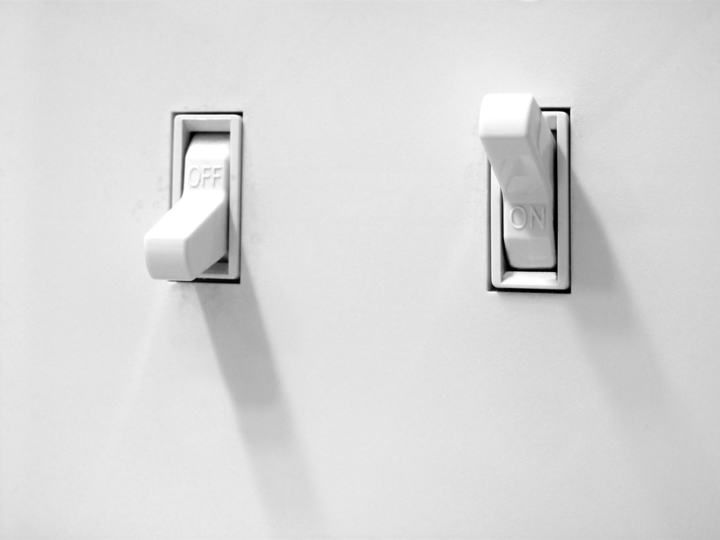
A wireless light switch has two parts: a transmitter (the bit you press) and a receiver (wired into the lighting circuit). The transmitter has no physical connection to the circuit — it sends a radio signal to the receiver, which acts as the actual switch in the wall. That decoupling is the whole point: the user-facing switch can sit anywhere, and you can have several of them controlling the same fixture without running any extra cable.
Where wireless switches differ most is in how the transmitter is powered.
| Type | Power Source | Pros | Cons | Best For |
|---|---|---|---|---|
| Battery-powered | AA, AAA, or coin-cell batteries | Cheapest option, widest selection, integrate with smart hubs | Batteries need replacing every 1–3 years | Most home smart-switch use cases |
| Kinetic (energy harvesting) | Mechanical energy from the press itself | No batteries, decades of maintenance-free service | Usually on/off only, fewer brand options | Long-term installs, retrofits, commercial spaces |
| Solar | Ambient light plus a small internal energy store | No batteries, keeps working in low light from stored energy | Needs regular daylight to keep the store charged | Outdoor switches, well-lit rooms, sunrooms |
Battery-powered switches
Battery-powered switches dominate the consumer market. Older one-way RF kits can fail without warning, but modern Z-Wave and Zigbee switches report battery percentage back to your hub or app and send a low-battery alert long before they die. A coin-cell switch with normal use typically lasts 1–3 years.
Kinetic switches
Kinetic switches collect energy from the mechanical movement of the button — no batteries, no wires. The amount of power generated is tiny, but enough for a brief RF pulse. The dominant supplier of kinetic switch modules is EnOcean, whose PTM modules are rated for around 100,000 button presses. At normal residential use rates that translates to several decades of service before the mechanism wears out.
Solar switches
Solar switches use ambient light and an internal energy store, so they keep working in the dark for hours or days at a stretch — they don't go blank the moment you turn the lights off. They're best in rooms with reasonable daylight or near a window. Buried at the back of a windowless closet, they'll struggle to stay charged, and a battery or kinetic model is the better choice.
Wireless Protocols and Smart Home Compatibility
The protocol on the box matters as much as the switch itself. It determines what hub or app you need, what range you'll get, and whether the switch will play with the rest of your smart home.
- Wi-Fi — no hub required, but each switch consumes a slot on your router. Best for one-off installs.
- Zigbee — low-power mesh network, requires a Zigbee hub (Hue Bridge, SmartThings, Home Assistant with a Zigbee dongle). Long battery life.
- Z-Wave — similar to Zigbee but on a less-crowded sub-GHz band, so it tends to penetrate walls better. Requires a Z-Wave hub.
- Bluetooth — short range, often used for direct phone control without a hub.
- Matter — a newer cross-vendor standard. Look for "Matter over Thread" or "Matter over Wi-Fi" if you want the broadest hub compatibility.
- 433 MHz RF / proprietary — common on cheap kinetic kits. Pairs to a brand-specific receiver only and won't integrate with smart-home platforms.
Indoor range varies by protocol and obstacles. Z-Wave and Zigbee typically give 30–100 feet through walls. Z-Wave Long Range models reach much further on line of sight. Wi-Fi tracks your existing Wi-Fi coverage. RF-only kits often advertise around 100 ft line of sight, but real-world indoor range is shorter. Always check the spec on the model you're considering.
Can Wireless Switches Dim LED Lights?
Most kinetic and basic RF wireless switches are on/off only. For dimming, look for a wireless dimmer specifically labeled as such, and check that it's rated for LED loads — "LED-compatible" or a list of supported bulb types is what you want to see. A second route is a smart switch that sends a dim percentage to a smart bulb instead of chopping the mains current; that approach works only if you're pairing with smart LEDs that accept brightness commands.
How Does A Wireless Light Switch Work?
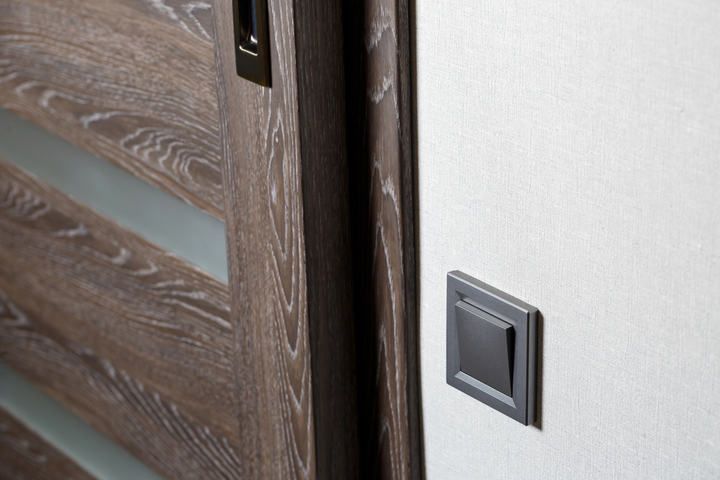
Pressing the switch sends an RF signal from the transmitter to the receiver. The receiver opens or closes the lighting circuit at the fixture, just like a traditional wall switch would.
The receiver sits anywhere on the line side of the fixture — inside the light fitting, behind an existing wall switch, or in a plug-in module for lamps and other corded devices. It's wired to mains permanently. The transmitter is what moves: a small RF sender that can be screwed to a wall, stuck to a door frame, or kept on a bedside table.
So a wireless switch isn't really a new kind of switch — it's the same on/off relay you already have, with the user-facing button untethered from the wall. The receiver is, in effect, just a replacement for a traditional light switch.
How To Install A Wireless Light Switch

There are two parts: wire the receiver into the lighting circuit, then mount the transmitter wherever you want.
⚠️ Safety and code: Wiring a receiver into a lighting circuit is mains electrical work. In many US states and across the UK, fixed-wiring work must be performed by a licensed electrician, and DIY work may need to be inspected and certified. If you're not sure of the rules where you live — or you're not confident with the wiring — hire a pro. The cost is small compared to the consequences of getting it wrong.
A note on wire colors: the instructions below use US (NEC) wiring conventions — black = hot/line, white = neutral, bare or green = ground, red = switched hot/load. UK and EU readers will see brown = live, blue = neutral, green/yellow = earth instead. The receiver's manual is the authoritative reference for your specific model and region.
Installing The Wireless Receiver
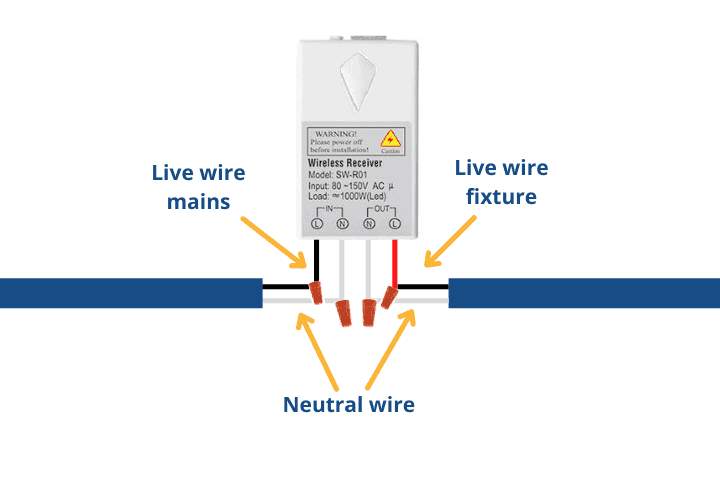
The receiver has three wires (line, neutral, load) and a wireless antenna that can look a little like a fourth wire. The antenna has no exposed conductor at the end, so it's easy to tell apart on closer inspection.
- Turn off power at the breaker. Verify the circuit is dead with a non-contact voltage tester before touching any conductors — never trust the wall switch alone.
- Unscrew the light fitting (or the existing wall switch) where the receiver will go.
- Identify the line, neutral, and load conductors. Line carries power from the breaker; load runs to the fixture; neutral returns to the panel. NEC permits a re-identified white conductor as a switch leg in older installs, so don't assume color alone tells you the role — confirm with a voltage tester. If the wires aren't clearly identifiable, stop and call an electrician.
- Connect the receiver's black (line) wire to the line conductor and the white (neutral) wire to the neutral conductor.
- Connect the receiver's red (load) wire to the conductor going to the light fixture.
- Tuck the wires back into the box, reinstall the fixture or switch plate, and restore power at the breaker.
Twist-on wire connectors ("wire nuts" or wire caps) are the simplest way to join the conductors — no solder or electrical tape needed.
Installing The Wireless Transmitter
The transmitter is the easy part — there's no wiring. Mount it wherever's convenient with the supplied screws, double-sided tape, or magnetic backing. Most kits include all three. A spirit level helps if you're screwing into drywall.
Pairing: out of the box, most kits come pre-paired and just work once the receiver is powered. Some require a manual handshake — typically you put the receiver into pairing mode with a button or a quick power cycle, then press the new transmitter within a short window. Smart-protocol switches (Z-Wave, Zigbee, Matter) pair through your hub's app instead of directly with a receiver. The exact procedure varies by brand, so the manual is the source of truth here.
Range And Buying Tips
Range depends on the protocol, your walls, and any nearby interference. Z-Wave and Zigbee usually give 30–100 ft indoors. Wi-Fi tracks your existing Wi-Fi coverage. RF-only kinetic kits run roughly the same 30–100 ft real-world depending on what's between transmitter and receiver. Z-Wave Long Range and mesh-extended Zigbee networks reach much further. Most consumer wireless switch kits quote a line-of-sight figure on the box, which is best-case — knock 30–50% off for a realistic indoor estimate.
When buying, look for clear certifications on the listing or packaging — FCC (US), CE (EU), UKCA (UK), and the relevant protocol-alliance logo (Zigbee Alliance, Z-Wave Alliance, Matter). Reputable brands disclose these regardless of where the product is manufactured. Unbranded kits sold purely on price often don't, and that's a better signal of corner-cutting than country of origin.
FAQ
Does a wireless light switch need a neutral wire?
The receiver does — it's wired permanently into the mains and needs both line and neutral to operate. The transmitter doesn't need any wiring at all; it's powered by its own battery, kinetic harvester, or solar cell.
Can wireless light switches dim LED bulbs?
Only if the kit is specifically labeled as a wireless dimmer and rated for LED loads. Standard kinetic and RF wireless switches are on/off only. A second option is a smart switch that sends dim commands to a smart bulb (rather than chopping the mains current) — that works only with smart LEDs.
Do I need a smart hub?
It depends on the protocol. Wi-Fi and basic RF kits don't need a hub. Z-Wave and Zigbee switches require a hub or coordinator (Hue Bridge, SmartThings, Home Assistant with a Z-Wave or Zigbee dongle). Bluetooth and Matter-over-Thread switches need a controller, but many phones and smart speakers can already act as one.
Will the signal go through walls?
Yes, but range drops with each obstacle. Drywall barely matters; brick, plaster, and metal-stud walls cut range significantly. Real-world indoor range for Z-Wave and Zigbee is typically 30–100 ft. If you have signal issues, mesh-network protocols often improve as you add more devices to the network — each one acts as a relay.
How long do the batteries last?
Typically 1–3 years for a Z-Wave or Zigbee switch with normal household use. Modern smart switches report battery percentage to your hub or app and send a low-battery alert before they die, so you won't be caught out.
Final Words
Wireless light switches earn their keep when running new wires would be expensive, disruptive, or impossible — adding a switch by the bed, controlling a lamp from across the room, or extending control to a space that never had a switch in the first place. They're not a replacement for proper electrical work, and they're not always the cheapest option if you're starting from scratch on a new build.
If wireless is right for the job, the buying decision comes down to three questions: do you want the switch to integrate with a smart home (pick Z-Wave, Zigbee, or Matter), do you need dimming (look for a wireless dimmer specifically labeled LED-compatible), and do you want truly zero maintenance (kinetic, with the trade-off of on/off only). Get those right and the rest is mounting screws.