
Why Is LED Light Buzzing When Dimmed? 4 Causes + Fix
A single 9W LED can buzz on a perfectly good dimmer just by falling below its 25–40W minimum load — the bulb isn't broken, the math is off.
 Eugen
EugenEugen Nikolajev
Creator of LED Lighting Info
Hi, I am Eugen. I was always one of those kids who had all sorts of weird lighting gadgets for every occasion.
Now, I want to share my knowledge and experience about lighting with you on LED Lighting Info.
Read my editorial standards
Key Takeaways
The buzzing usually comes from the bulb’s LED driver, the dimmer switch itself, or both — triggered by a mismatch between a TRIAC (forward-phase) dimmer and the LED’s electronic driver. Listen at both the bulb and the wall switch to identify the source before swapping parts.
A buzzing LED light on a dimmer circuit is one of the most common — and most fixable — complaints in home lighting. Most causes can be diagnosed in under 10 minutes without an electrician.
In this guide, I’ll cover:
- The four most common reasons LED bulbs buzz on a dimmer
- When the buzzing is actually a safety concern
- A step-by-step fix, working from the easiest checks first
4 Causes of LED Buzzing on a Dimmer

The four most common reasons your LED bulbs buzz on a dimmer:
- Dimmer-LED incompatibility — by far the most common cause; the dimmer’s switching method clashes with the bulb’s electronic driver.
- Loose wiring connections — intermittent contact at the fixture, switch, or breaker creates small arcs that buzz.
- Low-quality bulbs or dimmers — cheap drivers and poorly regulated dimmers are more likely to be audible.
- High demand on a shared circuit — another appliance feeds electrical noise back into the wiring your lights are on.
Dimmer-LED Incompatibility
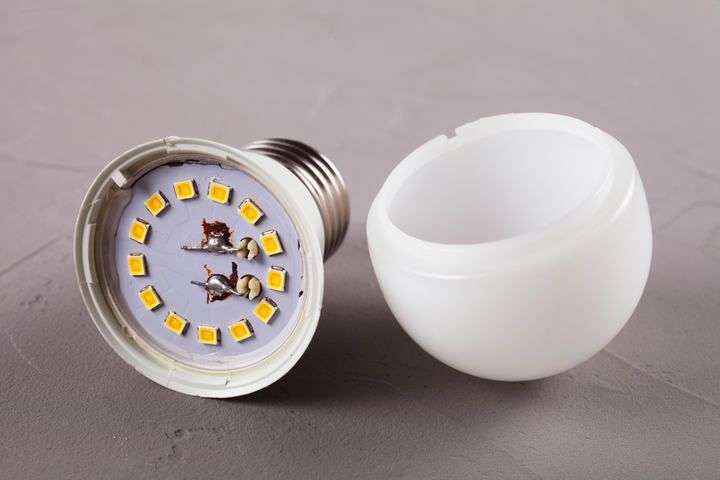
Standard wall dimmers in most U.S. homes are forward-phase TRIAC dimmers, originally designed for incandescent bulbs. They work by chopping the AC waveform — a method that LED drivers (the small electronic power supplies inside the bulb) often handle poorly. The chopped current can vibrate ceramic capacitors and inductor cores in the driver, or vibrate the dimmer’s own coil at line frequency. The result is an audible hum from the bulb, the wall switch, or both.
Even when both the bulb and dimmer are labeled “dimmable,” compatibility is pairing-specific. Lutron, Leviton, and other manufacturers publish compatibility lists for exactly this reason — a particular bulb may work flawlessly with one dimmer model and buzz with another.
Another common trigger is falling below the dimmer’s minimum load. Many LED dimmers require a minimum total wattage on the circuit (often 25–40W). A single 9W LED bulb on its own can fall below that threshold and cause buzzing or flicker even when the bulb and dimmer are individually compatible.
How to spot a dimmable bulb: check the packaging or product page for the explicit word “dimmable.” Not all LEDs are dimmable — non-dimmable bulbs are often cheaper, but they will buzz, flicker, or fail prematurely on any dimmer.
Loose Wiring Connections
A loose connection at the fixture, switch, or breaker causes intermittent contact and small arcs, which can themselves buzz audibly and feed an unstable voltage to the bulb — making the LED driver flicker and hum.
If the lights are flickering as well as buzzing, loose wires are the most likely cause and should be addressed first — they’re the only buzzing cause with a real safety dimension.
Low-Quality Bulbs or Dimmers
Cheaply-made bulbs and dimmers are more likely to buzz than well-engineered ones. Low-cost LED drivers often skip filtering components that smooth out the chopped waveform, and budget dimmers may not regulate the current cleanly. If you’re using bargain-bin parts on a dimmer circuit, replacing them with name-brand equivalents is often the easiest single fix.
High Demand on a Shared Circuit
In many U.S. homes, lights share a 15A or 20A branch circuit with general-purpose receptacles — the NEC allows this, and it’s especially common in older construction. That means a high-draw appliance plugged in nearby can interact with your lighting in two ways:
- A brief flicker as the appliance starts (an inrush voltage sag).
- A steady hum while it runs, caused by electrical noise (EMI) the appliance feeds back onto the shared wiring.
Variable-speed motors, switching power supplies (laptops, TVs, phone chargers), and battery chargers are common offenders. Moving the appliance — or your lighting — to a separate circuit usually resolves it. Adding a new circuit typically requires an electrician.
Are Buzzing LED Lights Dangerous?
Buzzing LED lights are usually not dangerous — but loose wiring is the exception, and it warrants attention.
Loose connections cause electrical currents to “jump” the gap between conductors, which is called arcing. Arc temperatures can exceed 10,000°F, and the U.S. Consumer Product Safety Commission attributes thousands of home fires each year to wiring faults including arcing. The NEC has required AFCI (arc-fault circuit interrupter) breakers on most living-area circuits since 2002 specifically to detect and shut off these faults.
If your lights are buzzing, switch off the breaker for that circuit and check for loose wires at the fixture, the dimmer switch, and (if accessible) the breaker itself. Most loose connections can be re-seated and tightened, but if you suspect a problem at the breaker and you’re inexperienced, call an electrician.
Using cheap or incompatible bulbs and dimmers is unlikely to cause an electrical fire, but it isn’t risk-free either: a non-dimmable LED on a TRIAC dimmer can drive the bulb’s internal driver outside its safe operating range, leading to overheating and premature failure. Expect a much shorter lifespan and, in rare cases, smoke or pops from the driver.
How To Stop LED Lights From Buzzing

Work from the most likely cause down. Compatibility and minimum-load issues account for the majority of buzzing complaints — start there before pulling any wires.
- Verify the dimmer is rated for LEDs and listed as compatible with your specific bulb. Check the dimmer manufacturer’s compatibility list (Lutron, Leviton, and others publish one).
- Confirm the bulb is labeled “dimmable.” Non-dimmable bulbs on a dimmer will buzz no matter what else you do.
- Check the dimmer’s minimum load. If only one or two low-wattage LEDs are on the circuit, add a higher-wattage bulb or switch to an LED-rated dimmer with a low minimum load.
- Listen at the bulb and the wall switch to identify which is buzzing. That tells you which part to replace first.
- Reseat the bulbs and check the fixture contacts for corrosion or debris.
- With the breaker off, inspect for loose wires at the fixture and the switch.
- If buzzing persists, replace the dimmer with an Electronic Low Voltage (ELV) model designed for LED loads.
Why ELV Dimmers Often Fix Buzzing
Standard dimmers use forward-phase (TRIAC) control, which can clash with LED drivers. ELV dimmers use trailing-edge (reverse-phase) control that’s gentler on LED electronics and often eliminates the buzz. Here’s how the common dimmer types compare:
| Dimmer type | How it controls the waveform | Best for |
|---|---|---|
| TRIAC (forward-phase) | Chops the leading edge of the AC waveform | Incandescent and halogen; often clashes with LED drivers |
| ELV (reverse-phase / trailing-edge) | Chops the trailing edge of the AC waveform | Modern LED drivers and low-voltage LEDs |
| No dimmer (smart bulbs) | Bulb dims itself over Zigbee or Wi-Fi | Replace the wall dimmer with a plain on/off switch first |
A few caveats before swapping in an ELV dimmer: they’re typically more expensive than TRIAC models, most require a neutral wire at the switch box, and they have their own minimum-load ratings. Even with an ELV dimmer, check the manufacturer’s compatibility list for your specific bulb — pairing still matters.
Switching to Smart Bulbs
Smart bulbs like Philips Hue (Amazon) dim themselves over Zigbee or Wi-Fi and need constant line voltage to receive commands — so the existing wall dimmer must be replaced with a plain on/off switch. Alternatively, lock the dimmer permanently to full with a Hue-compatible accessory like the Lutron Aurora, which mechanically holds an existing dimmer at maximum.
If you simply screw a Hue bulb into a fixture still controlled by a TRIAC dimmer, you’ll see flickering, dropped commands, and may still hear buzzing. Smart bulbs solve the buzzing problem only if the dimmer is removed from the circuit.
The Decision Hierarchy at a Glance
My rule of thumb when troubleshooting a buzzing dimmed LED, in order:
- Check the easy stuff first — is the bulb labeled dimmable, and is the dimmer LED-rated?
- Confirm the dimmer-bulb pairing on the manufacturer’s compatibility list and meet the minimum load.
- Inspect for loose wires (and any safety issues) before going further.
- Upgrade to an ELV dimmer, or replace the dimmer with an on/off switch and use smart bulbs.
Back in the days of incandescent bulbs, buzzing was easy to diagnose — a loose filament, replace the bulb. LEDs are more complex because each bulb contains an electronic driver that has to play nicely with the dimmer in the wall. Once you know what to listen for and what to check, the fix is usually straightforward.
Sometimes it’s LED lights causing buzzing in speakers or other audio gear instead — check my guide if that’s the version of the problem you’re dealing with.
FAQ
Why does my LED bulb buzz only when dimmed, not at full brightness?
At 100%, most dimmers pass the AC waveform through cleanly. As you dim, the dimmer chops the waveform — and that chopped current is what vibrates components inside the bulb’s driver and the dimmer’s coil. Buzzing that vanishes at full brightness almost always points to dimmer-LED incompatibility or a load-mismatch issue.
Can a buzzing LED bulb start a fire?
A direct fire from the bulb itself is rare. The real fire risk is loose wiring causing arcing, which the buzzing might be a symptom of. If buzzing is accompanied by a warm or scorched fixture, scorch marks at the switch, or a burning smell, switch off the breaker and inspect — or call an electrician.
Will a more expensive LED bulb stop the buzzing?
Sometimes. Better-quality drivers handle a chopped waveform more cleanly, so a premium bulb can fix buzzing on its own. But if the dimmer itself isn’t LED-rated, or if the circuit falls below the dimmer’s minimum load, even a top-tier bulb can buzz. Fix the dimmer side first.
Do I need an electrician to install an ELV dimmer?
If you’re comfortable replacing a wall switch and the box already has a neutral wire, no — most homeowners can swap one in safely with the breaker off. If your home is older and there’s no neutral at the switch box, you’ll either need an electrician to add one or look for a no-neutral-required ELV model.
Can a single LED bulb on a dimmer cause buzzing on its own?
Yes — and it’s a surprisingly common cause. Many LED dimmers have a minimum load of 25–40W. A single 9W LED bulb can fall well below that threshold, leading to buzzing or flicker even when the bulb and dimmer are individually compatible. Add another bulb to the fixture or switch to a low-minimum-load dimmer designed for LEDs.