
Do Smart Switches Require Smart Bulbs?
Flip the wall switch on a smart bulb and it goes offline instantly — unreachable from your phone until someone flips it back. A smart switch sidesteps that trap entirely.
 Eugen
EugenEugen Nikolajev
Creator of LED Lighting Info
Hi, I am Eugen. I was always one of those kids who had all sorts of weird lighting gadgets for every occasion.
Now, I want to share my knowledge and experience about lighting with you on LED Lighting Info.
Read my editorial standards
Key Takeaways
No, smart switches do not require smart bulbs. A smart switch will work with any compatible bulb on the circuit, and if you want to dim, you'll need bulbs explicitly labeled as dimmable.
You've just installed a smart switch, and now you're wondering: do my regular bulbs still work, or do I need to replace every one of them with a smart bulb too?
It's one of the most common questions for anyone new to smart lighting, and the answer matters — replacing every bulb in your home is a much bigger investment than swapping a single switch.
Below I'll cover:
- What smart switches actually do (and don't do)
- How smart bulbs differ and where they shine
- Critical wiring and compatibility pitfalls to check before you buy
- Which option makes the most sense for each room in your home
What Do Smart Switches Do?
A smart switch is an in-wall replacement for a regular light switch. It controls whatever fixture is wired to that switch — most commonly a hardwired ceiling light — and adds app, voice, and automation control on top of the physical paddle.
Important distinction: a smart switch does not control plug-in appliances on other outlets. To remotely control a floor lamp or coffee maker, you'd use a separate product called a smart plug or smart outlet. The two are often used together in the same home, but they're distinct categories.
Form factors vary — single paddle, rocker, touch panel, and others. The Lutron Caseta PD-6WCL, for example, is a single paddle with dedicated on/off, dim-up, dim-down, and favorite buttons all on one face.
Typical features across smart switches include:
- Dimming and on/off control from a single panel
- Customizable light fade speed
- Minimum and maximum brightness settings
- Tap-sequence programming and scene control
- Remote control via app and voice assistants
- Schedules and automations
Energy-usage monitoring is sometimes mentioned alongside smart switches, but it's far more common on smart plugs. Most popular smart dimmers — including all Caseta models — don't report energy usage. A few exceptions exist (such as certain Leviton Decora Smart models), but it's not the norm.
App complexity also varies by manufacturer, and depending on the bulbs you have in place, different settings can help fix issues such as flickering.
Check Your Wiring Before You Buy
Before you pick a smart switch, check the wiring inside your existing switch box. The majority of smart switches on the market require a neutral wire, which many older homes (typically pre-1980s) don't have at the switch location. Installing a neutral-required switch in a box without one means rewiring — a real job for an electrician.
The Lutron Caseta line is one of the few major exceptions: it does not require a neutral wire, which makes it the go-to recommendation for older homes. Always confirm the switch's wiring requirements on the product spec sheet before purchasing.
Dimming Requires Dimmable Bulbs
If you want to dim your bulbs with a smart dimmer, the bulbs themselves must be specifically labeled "dimmable" on the packaging. Non-dimmable LEDs are the default — putting one on a dimmer typically causes visible flicker, audible buzzing, and a noticeably shorter bulb life, sometimes with potential damage to the driver.
Fluorescent and CFL bulbs are generally not dimmable either. Dimming a fluorescent requires a fixture with a dedicated dimming-rated ballast plus dimmer-compatible lamps, and even "dimmable" CFLs need a long warm-up period and don't dim smoothly across the full range.
What Is the Main Benefit of Smart Bulbs?
Smart bulbs' main benefit is flexibility per-bulb. Each bulb can have a different brightness or even color, depending on the model you buy.
You can also adjust how cool or warm the white light is throughout the day, effectively mimicking natural light inside your home.
Smart bulbs fit into any standard lighting fitting. Just be aware that some smart bulbs require a bridge, while others can be controlled individually straight over Wi-Fi.
Newer Philips Hue bulbs, for example, include built-in Bluetooth, which lets you control up to 10 of them directly from the Hue Bluetooth app while you're in the same room. Adding the Hue Bridge unlocks the full experience: up to 50 bulbs, room grouping, schedules and automations, remote access when you're away, and integration with Alexa, Google Home, and Apple HomeKit.
The "Always-On" Catch
Smart bulbs need constant power to receive commands. That means the wall switch controlling them has to stay on at all times — flip it off and the bulb goes dark and offline, with no way to control it from your phone or voice assistant until someone flips the switch back.
This is the biggest practical headache with smart bulbs in shared households. Anyone unaware of the setup will instinctively use the wall switch, which defeats the smart features entirely. Common workarounds include smart switch covers that prevent the paddle from moving, or pairing the bulbs with a smart switch from the same ecosystem that sends a wireless signal instead of cutting power.
Ecosystem and Hub Compatibility
Smart switches and smart bulbs often live in different ecosystems and don't always talk to each other natively. A Caseta switch and a Hue bulb, for instance, can both be controlled from the same Apple Home or Alexa app — but they won't communicate directly without that intermediary platform.
Before buying, pick the ecosystem you want to live in (Apple Home, Alexa, Google Home, SmartThings, or Matter) and confirm both the switch and the bulb support it. Otherwise you'll end up juggling separate apps for devices in the same room.
Smart Switch vs. Smart Bulb: Key Differences
| Feature | Smart Switch | Smart Bulb |
|---|---|---|
| What it controls | All bulbs on the circuit (typically hardwired fixtures) | Just that individual bulb |
| Installation | Replaces existing wall switch; may require neutral wire | Screws into any compatible socket |
| Works with regular bulbs | Yes (dimmable LEDs required for dimming) | N/A — the bulb is the smart device |
| Per-bulb color and brightness | No — all bulbs change together | Yes — each bulb independently |
| Wall switch still works normally | Yes — physical paddle always functional | Only if switch stays on; flipping it off disables smart control |
| Best for | Whole-room lighting, hardwired ceiling fixtures, households with multiple users | Scene/color control, lamps, single-bulb fixtures |
| Approximate cost per unit | ~$50–70 (Caseta dimmer) | ~$15–20 (white-only Hue) or ~$40–50 (color Hue) |
Do Smart Switches Require Smart Bulbs?
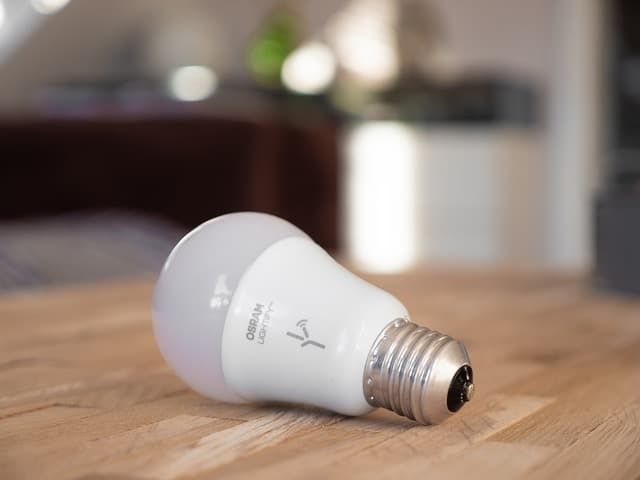
No — but there are a few benefits to using them together.
If you pair a smart switch with smart bulbs from the same ecosystem, the switch can send wireless commands to the bulbs instead of cutting power to them. That preserves the bulbs' smart features (they stay online), keeps the wall control intuitive for guests and family, and lets you trigger scenes, colors, and per-bulb brightness from either the switch or an app.
You can also bring both into the same voice assistant. If you use Siri, pick switches and bulbs that are HomeKit-compatible; the same applies to Alexa and Google Home. Matter-certified devices broaden cross-ecosystem compatibility further.
Why Is Having Both Not Necessary?
The main appeal of both smart switches and smart bulbs is remote control of your lighting — from your phone or a smart home device like Alexa or Google Assistant. For that single goal, you only need one or the other in any given room.
Installing both everywhere gets expensive fast, and most households never use the overlap. My rule of thumb: pick the option whose strengths match what each room actually needs, and only double up where you genuinely want per-bulb color control on top of a smart switch.
Here's how the cost of smart switches and smart bulbs compares for a typical room with around 15 bulbs on a single circuit.
| Setup | Unit Cost (approx.) | Units Needed | Total |
|---|---|---|---|
| Smart switch (e.g., Lutron Caseta PD-6WCL) | $50–70 | 1 | $50–70 |
| Color smart bulbs (e.g., Philips Hue A19 color) | $40–50 | 15 | $600–750 |
| White smart bulbs (e.g., Philips Hue white A19) | $15–20 | 15 | $225–300 |
Prices are approximate and shift over time — check current listings before buying. Even at the low end, kitting out one room with smart bulbs costs several times what a single smart switch does.
Worth noting on switch capacity: the Caseta PD-6WCL is rated for 150 W of dimmable LED load. A typical 60 W-equivalent LED draws about 8–9 W, so a single dimmer can comfortably handle 16–18 of them on the same circuit. Lutron's ELV+ models like the DVRF-5NE step that ceiling up to 250 W of LED load.
Which Is the Right Choice for You?

It comes down to what you're trying to light. Three quick examples:
Kitchen — go with a smart switch
Kitchens often have 10 or more ceiling bulbs on one circuit, and the main use is task lighting for cooking. You want everything bright and uniform, not per-bulb color tuning. A single smart dimmer handles the whole room and is by far the most cost-effective option — swapping 10+ bulbs for smart ones is overkill for a room you'd rarely use to its full creative capacity.
Bedroom — smart bulbs in the lamps
Bedrooms typically combine a ceiling light with a lamp on each side of the bed. In the evening you might want to watch a movie, read, or just unwind — each scenario calls for different bulbs at different brightnesses and colors. Smart bulbs in the bedside lamps let you adjust the color and feel of the room independently. With only two or three bulbs involved, the cost stays reasonable.
Living room — both, working together
A living room with recessed ceiling lights plus a couple of floor or table lamps is the classic case for combining the two. Use a smart switch for the recessed cans (one paddle, whole-room dimming) and smart bulbs in the lamps for scene-based color and accent lighting. A separate smart plug can handle a string-light or sculpture lamp that lives on an outlet.
Final Words
The right mix of smart lighting depends on what each room is for and how you actually use it — but you do not need to buy smart bulbs to make a smart switch work.
Before you buy anything, check three things: your switch box has a neutral wire (or pick a Caseta that doesn't need one), your bulbs are explicitly labeled dimmable if you want to dim them, and both the switch and any bulbs share the same ecosystem (Apple Home, Alexa, Google Home, SmartThings, or Matter). Get those right and the rest is just choosing what fits each room.